Contact us
 Customer Area
 Visit LWS
Rate this article :
2.6/5 | 63 opinion
This article was useful to you ?
 Yes
Yes
 No
No
 Article read
140225 once
Article read
140225 once Merci ! N'hésitez pas à
poser des questions sur nos documentations si vous souhaitez plus d'informations et nous aider à les
améliorer.
Merci ! N'hésitez pas à
poser des questions sur nos documentations si vous souhaitez plus d'informations et nous aider à les
améliorer.Vous avez noté 0 étoile(s)



Sommaire
Procédure
The DNS zone of a domain name is used to link your domain to various services: a website, e-mail or external services.
In this article, you will learn :
This documentation is aimed at users with a domain managed on LWS hosting (LWS Panel, cPanel, Plesk or ISPConfig).
Before changing your domain's DNS zone, make sure that :
A DNS change can affect the operation of your website or emails. Always check the information you have entered before saving any changes.
The DNS zone contains information that tells the Internet where the services linked to your domain are located.
For example, it can be used to define :
Each piece of information is stored in a DNS record.
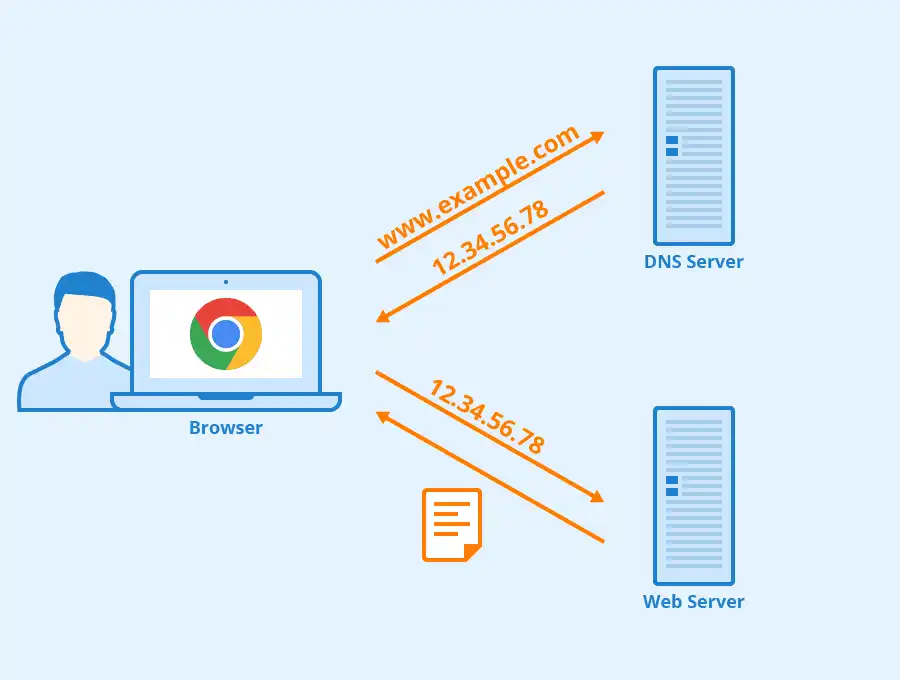
When someone enters your domain in a browser or sends an e-mail to your address, DNS servers consult these records to find out where to direct the request.
Here are the most commonly used record types.
This is used to point a domain or sub-domain to an IP address.
Example: mydomain.com → 192.0.2.10
This is generally used to connect a domain to a web server.
A CNAME is used to point a sub-domain to another domain name.
Example: blog.mydomain.com → mydomain.com
It is often used to connect a sub-domain to an external service (site builder, SaaS platform, etc.).
MX records indicate which server receives emails for your domain.
They are essential for using the e-mail addresses associated with your domain.
A TXT record is used to add information in text form to the DNS zone.
It is often used to :
NS records indicate which DNS servers manage the domain's DNS zone.
Changing NS records allows you to delegate DNS management to another service.
You may need to change the DNS zone in various situations:
If you are not sure what type of record to modify, consult the documentation provided by the service you wish to connect.
The method depends on the control panel that administers your domain.
Select the documentation corresponding to your environment:
After a DNS zone modification, the changes are not immediately visible.
In general :
This period depends on the DNS cache used by ISPs and DNS servers.
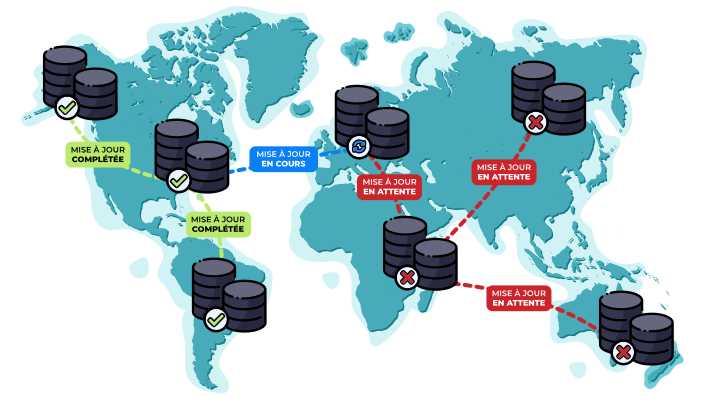
During this period, some users may see the old configuration, while others may already see the new one.
Once you have modified the DNS zone, you can check the result in several ways.
For a website
Check that your domain opens the correct website in your browser.
For emails
Send a test e-mail to your address to check that the messages have been received.
For domain validation
Go back to the service that requested the DNS change to check that the domain is validated.
Checking DNS propagation
You can also use an online tool to check the global propagation of your DNS change, for example :
These tools allow you to see whether the new DNS records are visible on different servers around the world.
Check :
If your DNS zone changes don't seem to be working, check that you are changing the DNS zone in the right place.
Check that your domain is using LWS DNS servers. If this is not the case, the active DNS zone may be managed by another provider.
In this case, changes should be made directly on the control panel of the service that manages the domain's DNS (Cloudflare, OVH, o2switch, Hostinger, Wix, etc.).
If you modify the DNS zone in a panel that does not manage the domain's DNS, the changes will not be applied.
Check :
Check :
DNS management depends on the service where your domain is configured.
If you're not sure, check your customer area or contact LWS support.
The DNS zone allows you to connect your domain to your website, your emails or various online services.
Before making any changes :
Remember that DNS changes can take up to 48 hours to be fully visible on the Internet.
Rate this article :
2.6/5 | 63 opinion
This article was useful to you ?
Yes
No
6mn reading
Redirecting a domain name to another web address
1mn reading
1mn reading
Check that my domain is properly configured on my server or shared hosting service
4mn reading
Bonjour,
Merci de votre retour.
Selon les conditions générales d'enregistrement des domaines, le registre peut exiger que vous confirmiez votre adresse email.
Le mail de confirmation du registre vous est envoyé sur la boite-mail lié à votre compte LWS.
Afin de débloquer votre domaine, il faudra vérifier que vous avez bien reçu un email de confirmation de votre adresse email et ensuite, il faudra cliquer sur le lien de validation ou saisi le code de confirmation qui vous a été fourni et patienter au maximum 48h pour qu'il soit débloqué.
Je vous remercie de votre attention et reste à votre disposition pour toute autre question ou complément d'information.
Si vous avez besoin d'aide supplémentaire, n'hésitez pas à nous contacter à nouveau via notre plateforme de support disponible sur votre espace client LWS. (https://aide.lws.fr/a/268)
Cordialement, L'équipe LWS
Bonjour,
Si votre domaine est géré par LWS, vous êtes sur la bonne documentation. Selon la formule que vous avez souscrite chez LWS, la marche à suivre peut différer. Je vous invite à vous reporter à la section III de cette documentation qui vous propose un lien pour avoir les détails des configurations possibles suivant la formule que vous utilisez.
Cordialement, L'équipe LWS
Bonjour,
Merci de votre retour.
Une solution existe pour transférer vos mails vers LWS, il s'agit de l'outil IMAP Copy de LWS.
Nous vous invitons à contacter notre service support à travers votre espace client, afin de vous apporter une aide dans le transfert de vos adresses mails. (Contacter le support LWS)
Cordialement, L'équipe LWS
Bonjour,
Nous vous remercions pour votre question et votre intérêt envers LWS, d'après vos explications toutes les démarches pour mettre votre domaine sur une autre formule d'hébergement ont bien été faites. Mais malheureusement, nous ne pouvons pas vous aider directement via cette plateforme de question sous nos aides.
Nous vous invitons donc à contacter notre système de support client pour obtenir de l'aide spécifique à votre situation. Nous avons une équipe de professionnels qualifiés prêts à vous aider et à répondre à toutes vos questions avec précision et rapidité. (Contacter le support LWS)
Merci de votre compréhension et nous espérons pouvoir vous aider bientôt.
Cordialement, L'équipe LWS
Bonjour,
Afin de transférer votre nom de domaine auprès de LWS il suffit de suivre cette documentation : https://aide.lws.fr/a/60
Enfin, pour lier votre nom de domaine à system.io cette documentation vous sera utile : https://aide.lws.fr/a/1934
Je vous remercie pour votre attention et reste à votre disposition pour toute autre question ou complément d'information.
Vous pouvez également contacter notre support technique pour obtenir de l'aide.
Vous pouvez nous contacter depuis votre espace client ou sur cette page : https://www.lws.fr/contact.
Cordialement, L'équipe LWS
Bonjour,
Je vous remercie pour votre message.
Afin qu'un spécialiste vous vienne en aide, contactez-nous en suivant ce guide : https://aide.lws.fr/a/434
Indiquez bien ce qui vous pose soucis / questions dans ce ticket.
Je vous remercie pour votre attention et reste à votre disposition pour toute autre question ou complément d'information.
Vous pouvez nous contacter depuis votre espace client ou sur cette page : https://www.lws.fr/contact.
Cordialement, L'équipe LWS.
 About LWS :
LWS is a 100% French web hosting company that focuses on quality and innovation and offers a responsive and competent technical service at affordable prices.
About LWS :
LWS is a 100% French web hosting company that focuses on quality and innovation and offers a responsive and competent technical service at affordable prices.