Contact us
 Customer Area
 Visit LWS
Rate this article :
5/5 | 1 opinion
This article was useful to you ?
 Yes
Yes
 No
No
 Article read
23482 once
Article read
23482 once Merci ! N'hésitez pas à
poser des questions sur nos documentations si vous souhaitez plus d'informations et nous aider à les
améliorer.
Merci ! N'hésitez pas à
poser des questions sur nos documentations si vous souhaitez plus d'informations et nous aider à les
améliorer.Vous avez noté 0 étoile(s)



Sommaire
Procédure
This article explains how to move a service purchased from LWS (e.g. domain name, LWS hosting, cPanel, VPS, Cloud Drive, etc.) from one LWS customer account to another.
Any product or service linked to the customer account (Mail Pro, VPS, domain name, LWS shared hosting, cPanel, Cloud cPanel, Plesk Windows).
Not affected: only move the option attached to a service to another service.
Before you start, make sure that :
Moving a service means that :
⚠️ This operation does not delete the service. It only changes its attachment to the customer account.
Moving a service is irreversible. To cancel it, a new transmission from account to account in the other direction must be carried out.
First, you need to log in to your LWS account.
Then click on your LWS ID at the top right of the page.
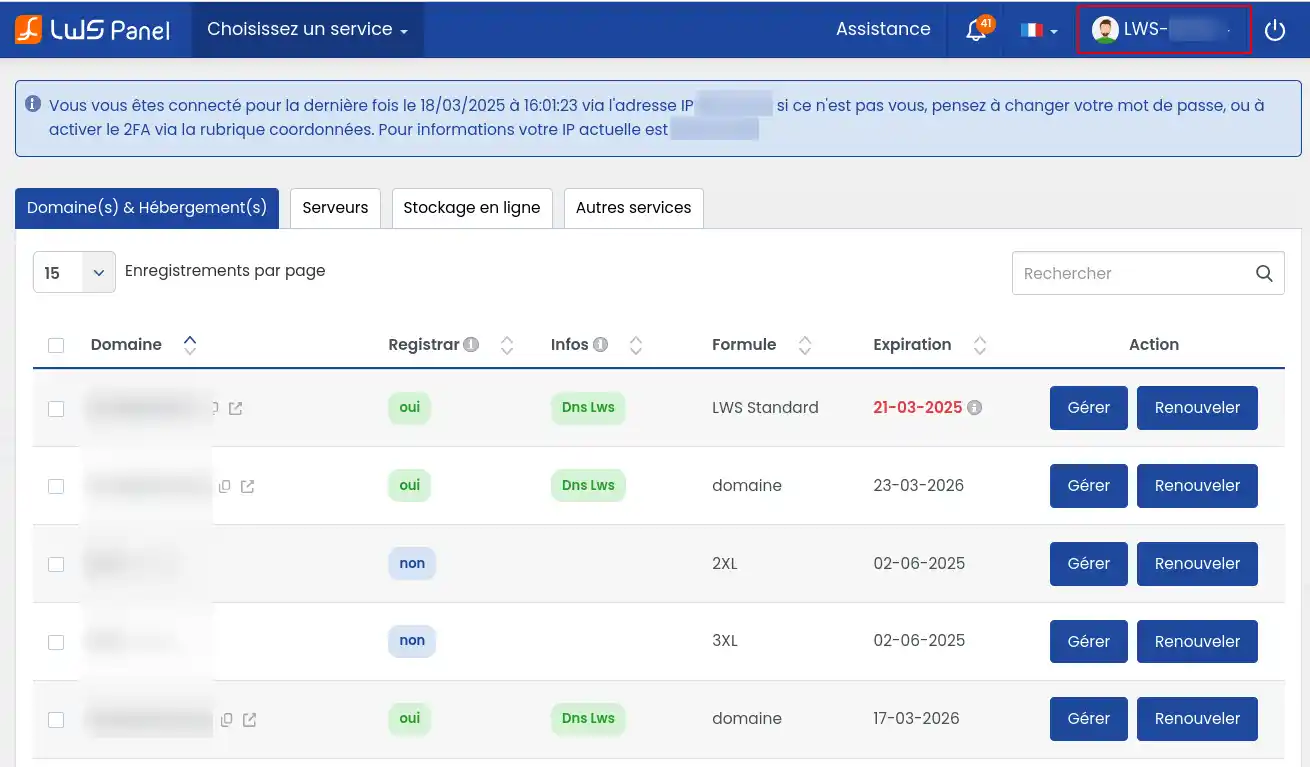
In the menu that appears, click on"Move service".
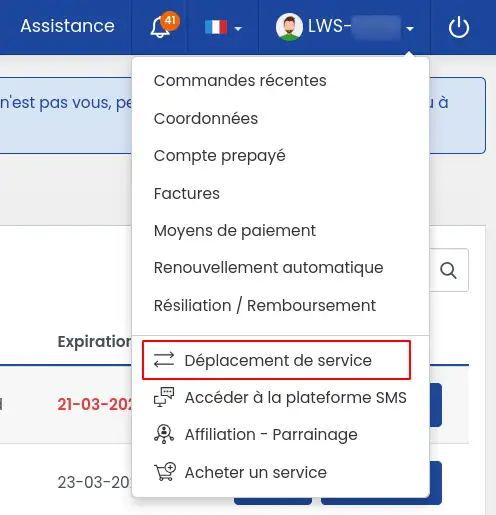
This will take you to the page where you can move a LWS product to another LWS account.
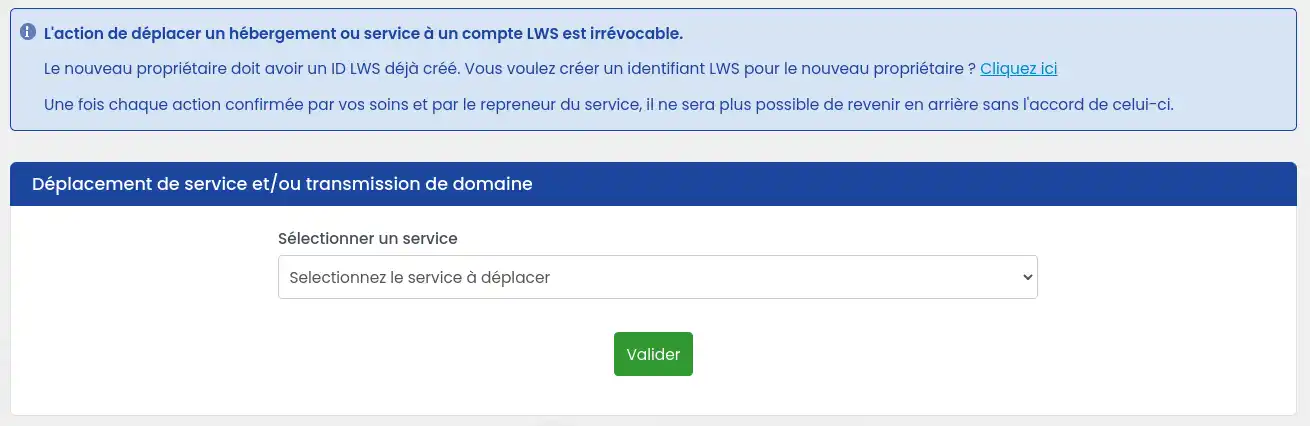
If the new owner or manager of the product does not already have an LWS account, we invite you to create one for them by following the procedure below:
Click on the"Click here" link to create a new LWS account.

Fill in the required fields:
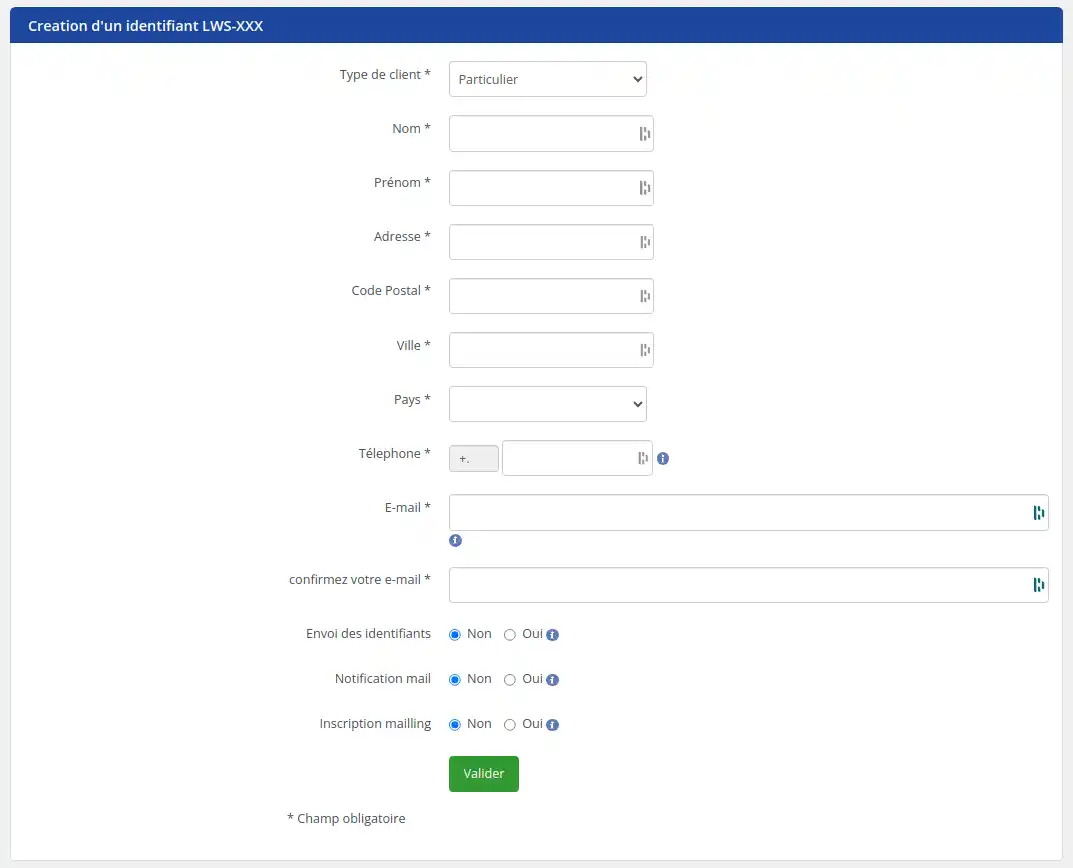
If the new account is to receive ownership of a domain name, it is essential to check carefully that the new owner's details are accurate and up to date. We strongly recommend that you double-check before confirming the changes, to ensure that they are correct. Any error in entering the new owner's details after the domain name ownership transfer process has been completed will require a new transmission and payment of the associated fees.
Please select"Yes" on"Send identifiers" so that the new owner receives his parameters.
You can then click on the green"Validate" button.
Once the creation is complete, an email will be sent to the email address entered in the new LWS customer account creation form. This contains the new LWS ID you will need for the rest of the procedure.
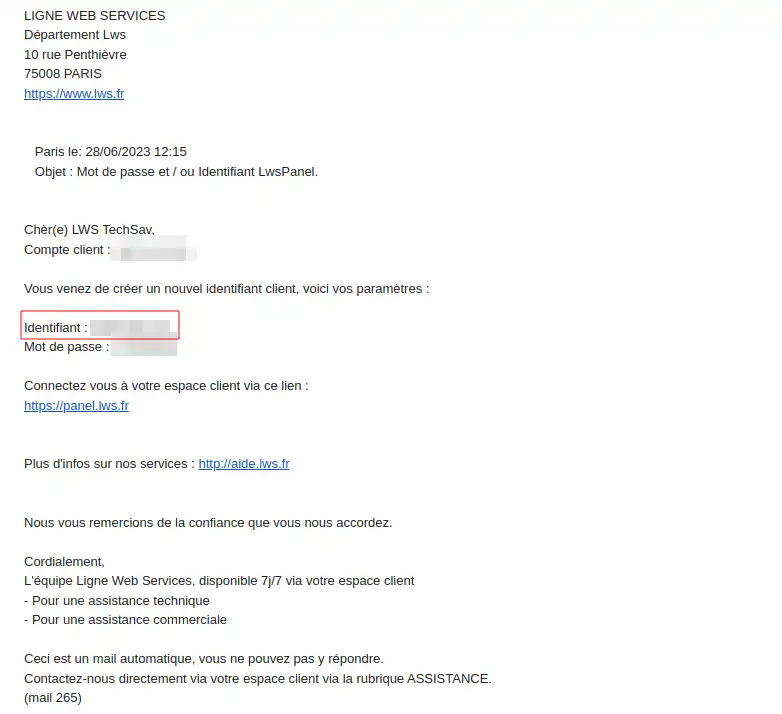
Follow the steps below to transfer one of your domain names:
On the service forwarding page, select the domain name you wish to forward to another account.
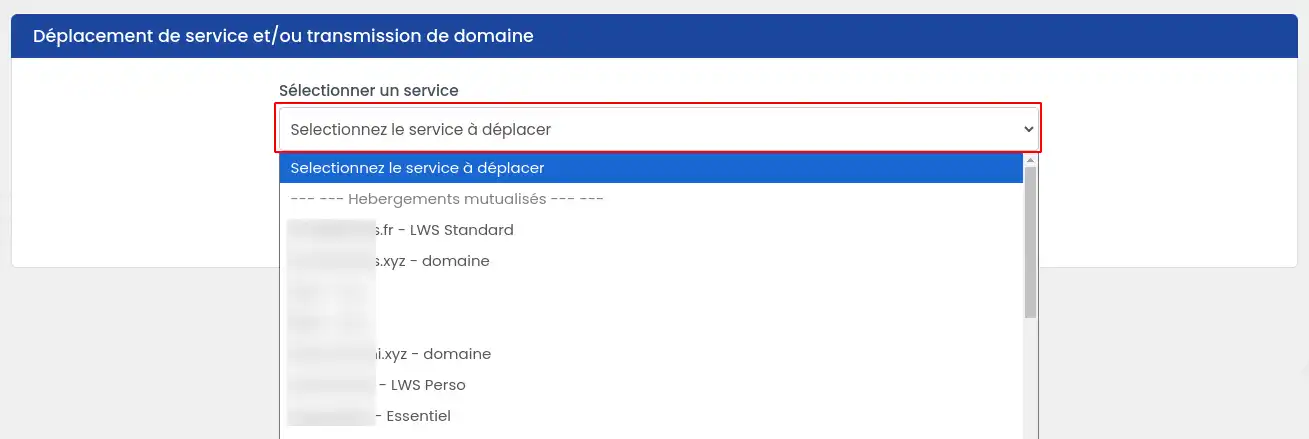
Then select the type of transfer you want.
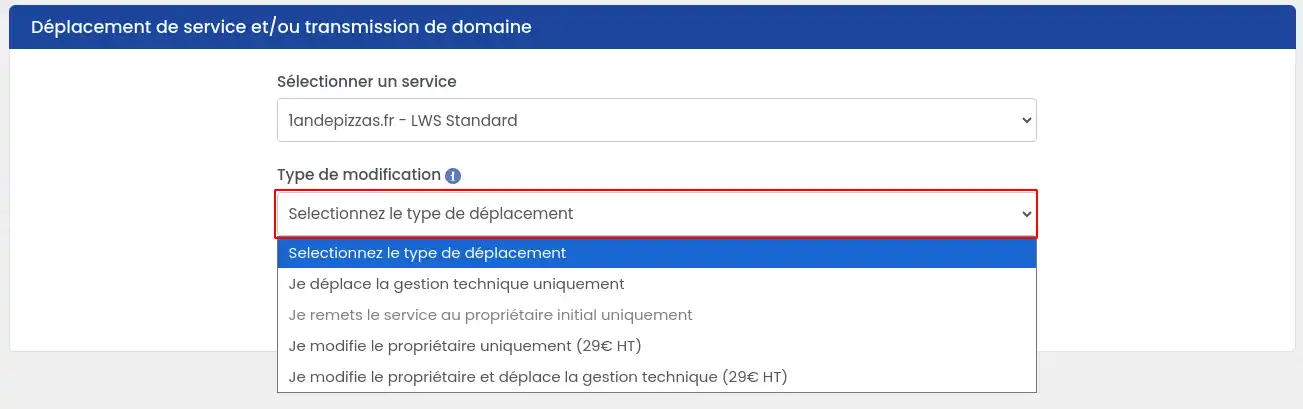
There are several options at this stage:
Once you have made your choice, you need to finish filling in the form.
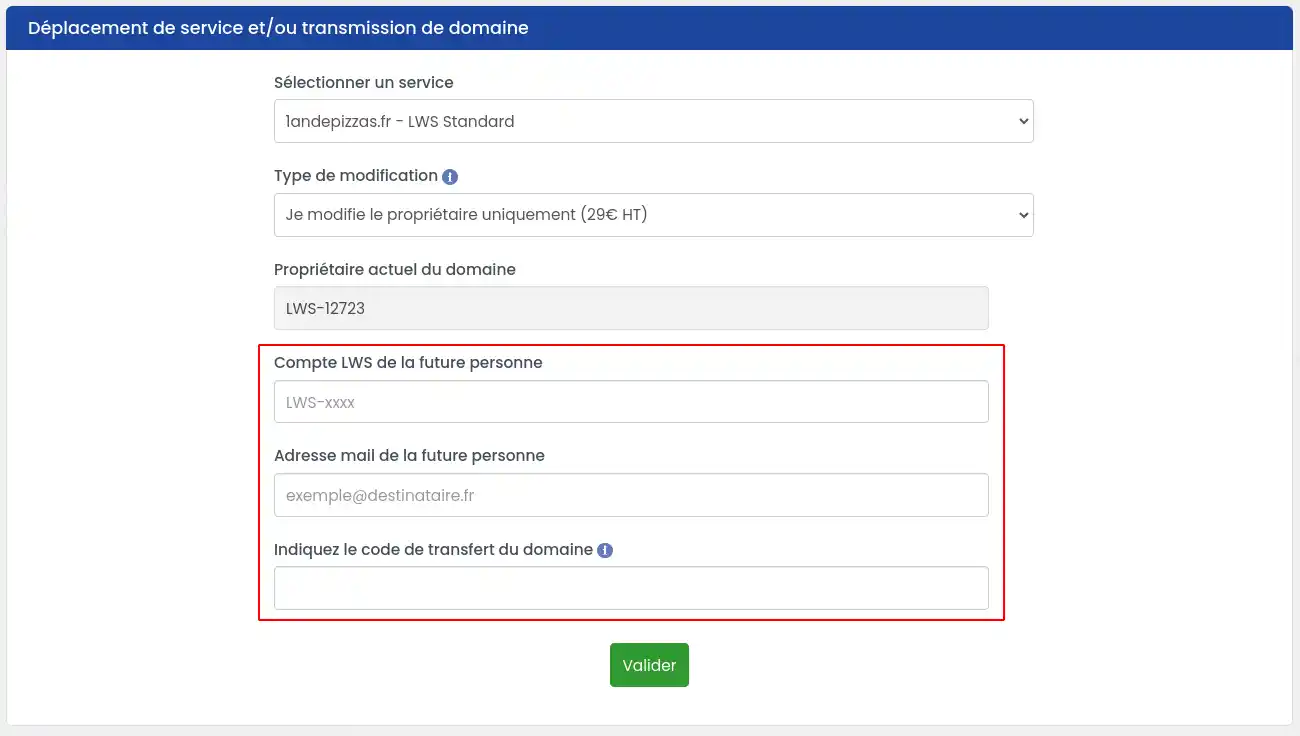
On the service transfer page, select the product you want to transfer to another account.
Once you have made your choice, you need to finish filling in the form.
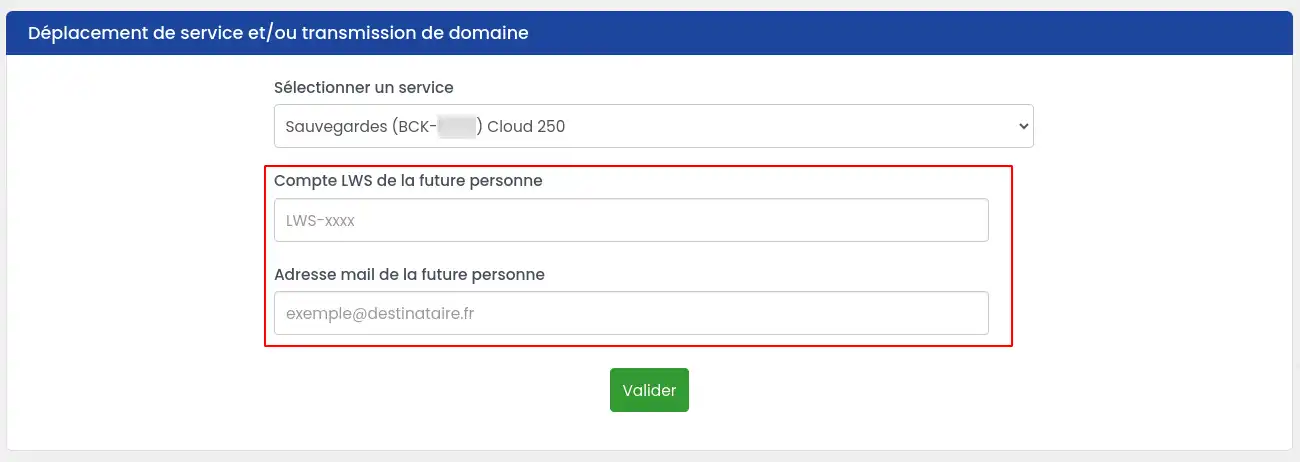
Two emails containing a request to confirm the transfer will be sent, one to the account that made the request and the other to the new account that receives the property and/or technical management. Each e-mail contains a link to a form for confirming the move.
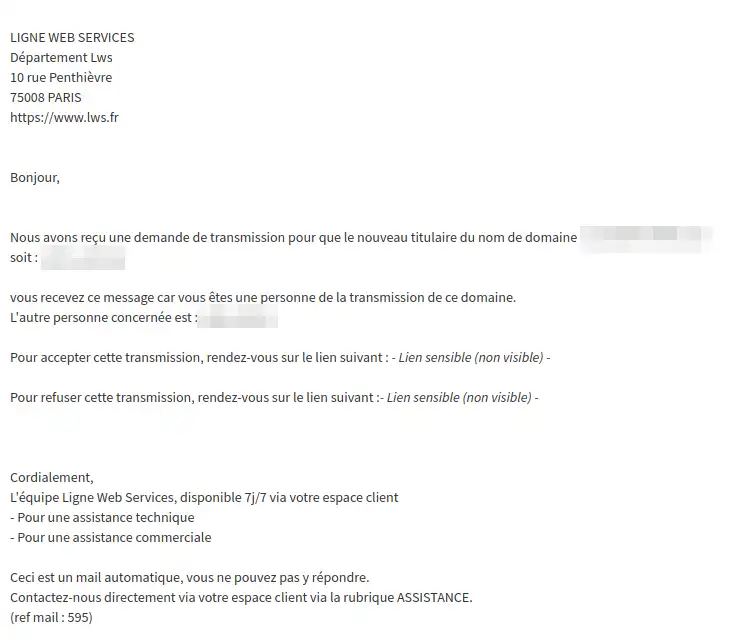
Click on the link to accept the transfer and you will be redirected to a new page where you must choose the option"I validate, I wish to transfer my domain/service", then click on"Confirm my request". If, however, you wish to cancel your request, you can select the other option"I cancel, I do not wish to transfer my domain/service".

[
The action of moving a domain name, service or hosting is definitive; it will no longer be possible to go back without the agreement of the domain name, service or hosting provider.
If the emails are not validated within 7 days of the request, the request will be cancelled[/bcolor].
In the case of a transfer of technical management AND ownership of a service, 2 validation emails are sent to the transferor and 2 others to the transferee. The purpose of each is to validate the transfer of ownership and the transfer of technical management. All 4 emails must be validated to finalise the transfer in its entirety.
Once the link in the two emails has been validated, check that the transfer has been carried out correctly.
In the destination account :
In the sending account :
Deadlines
There are several possibilities:
Possible causes :
Solution:
Ask the owner of the destination account for their exact login and email address.
If one of the two accounts has not confirmed the transmission by e-mail within the 7-day time limit, the account that made the request will receive an e-mail informing it that the transmission could not be carried out and has been cancelled.
A link in the email will allow the account to restart the request. This will send two new emails, both of which will have to be validated, even if one of the two accounts had already confirmed the transmission previously.
If the Pro mail service is linked to a domain name managed by LWS, you cannot transfer the Pro mail service alone without the domain.
You must transfer management of the domain to the LWS account that you want to also manage the Pro mail service. Transferring the domain name will also automatically transfer the Pro mail service.
Check your e-mail address and your spam or junk mail folder.
If you still can't find the e-mail, contact our customer support service.
You can move a service without a domain name to another customer account in just a few clicks from your customer area.
The operation is quick, usually immediate, and does not change the technical configuration of the service.
Rate this article :
5/5 | 1 opinion
This article was useful to you ?
Yes
No
0mn reading
How do I use my Customer Centre?
1mn reading
Customer account management
0mn reading
How do I change the language displayed in your customer area?
1mn reading
How can I check that my formula is being used on the LWS Panel?
Bonjour,
Je comprends votre situation. Cependant, pour ce type de demande technique et afin d’obtenir une solution adaptée à votre cas, je vous invite à contacter directement l’assistance technique de LWS. Ils pourront vérifier votre compte en détail et vous aider à rétablir l’accès à votre serveur VPS.
Je vous remercie pour votre attention et reste à votre disposition pour toute autre question ou complément d'information.
Cordialement, L'équipe LWS
 About LWS :
LWS is a 100% French web hosting company that focuses on quality and innovation and offers a responsive and competent technical service at affordable prices.
About LWS :
LWS is a 100% French web hosting company that focuses on quality and innovation and offers a responsive and competent technical service at affordable prices.