Contact us
 Customer Area
 Visit LWS
Rate this article :
3.8/5 | 11 opinion
This article was useful to you ?
 Yes
Yes
 No
No
 Article read
56504 once
Article read
56504 once Merci ! N'hésitez pas à
poser des questions sur nos documentations si vous souhaitez plus d'informations et nous aider à les
améliorer.
Merci ! N'hésitez pas à
poser des questions sur nos documentations si vous souhaitez plus d'informations et nous aider à les
améliorer.Vous avez noté 0 étoile(s)



Sommaire
Procédure
This article explains how to retrieve the transfer code (Auth / EPP code) for your domain name registered with LWS.
This code is required if you wish to transfer your domain name to another provider (registrar).
The request is made from your LWS Customer Centre, and the code is generally sent by e-mail within 6 hours.
Before you start, please ensure that :
| Domain extensions | .fr | .eu and .be | .lu | .ch | .uk |
other extensions |
| Does the TLD have transfer protection? | No | No | No | No | No | Yes |
| Do we need a transfer code? | Yes | Yes | No | Yes | No | Yes |
| Do we need the TAG of the new registrar? | No | No | No | No | Yes | No |
| What is the standard transfer time? | 10 days | immediate | 10 days | 1 to 10 days | immediate | 1 to 10 days |
| What is the maximum transfer time? | 22 days | immediate | 15 days | 10 days | immediate | 10 days |
| Is there a waiting period before a transfer is possible? | No | No | 60 days after purchase, transfer, renewal or change of details | 60 days after purchase, transfer, renewal or change of details | 60 days after purchase, transfer, renewal or change of contact details |
The transfer code (also known as the Auth code or EPP code) is a unique security code.
It works like a temporary password that authorises the transfer of your domain name to another provider.
Without this code, the transfer cannot be initiated.
This system prevents a third party from transferring your domain without your authorisation.
Go to your LWS Customer Centre and log in with your login details.
Once logged in, access the list of your domain names.
In the list of your domains :
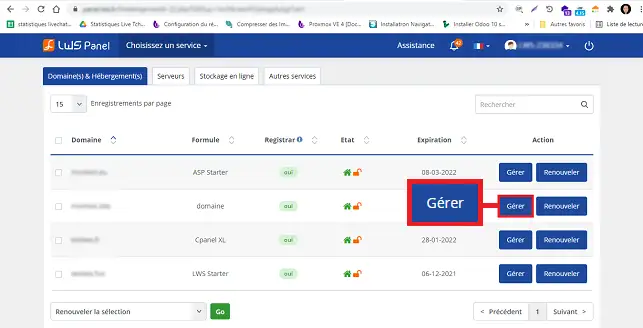
This will take you to the management page for this domain.
The transfer code is sent by e-mail to the address of the owner of the domain name.
Before requesting the transfer code, check the following points:
If this address is not correct :
For security reasons, domains are generally protected against transfer.
This protection prevents unauthorised transfers.
To recover the code :
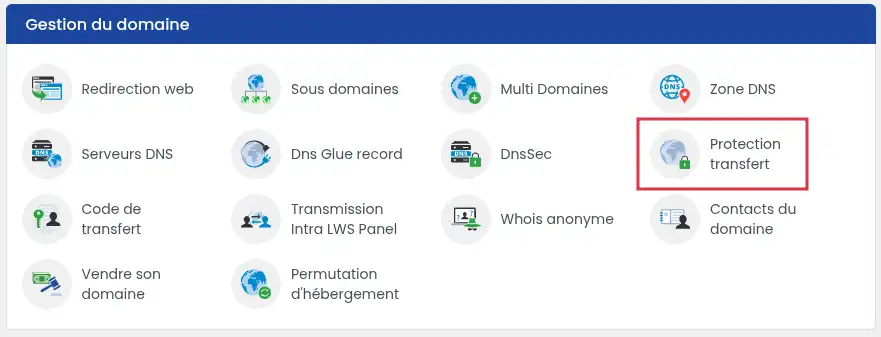
click on the "Transfer protection" icon in the "Domain management" section.
Deactivate the domain's protection against transfer, then click on the "Validate" button.
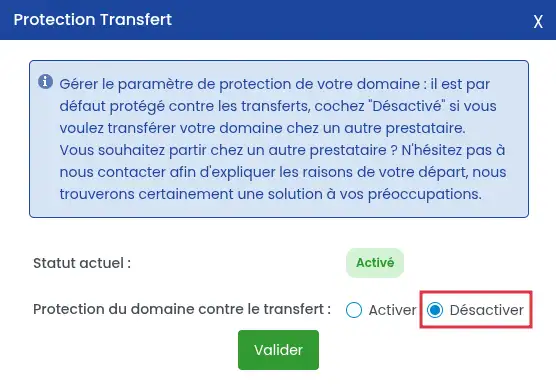
This operation does not transfer the domain.
It simply authorises the transfer request.
Once protection has been deactivated :
click on the"Transfer code" icon in the "Domain management" section .
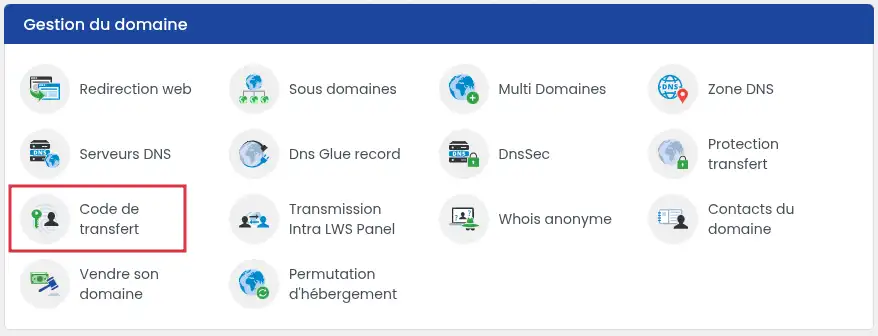
then click on the"Request code" button
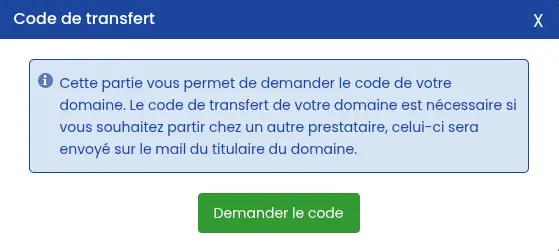
Your request is now saved.
The Auth / EPP code is sent automatically by e-mail to the address associated with the contact who owns the domain name. The delivery time is usually short, but can take up to 6 hours. The procedure is successful when the message arrives at the e-mail address associated with the contact who owns the domain. The code generally looks like a series of letters and numbers. You can then copy this code and provide it to your new provider when you request the transfer. Check : If you still receive nothing after 6 hours, make another request or contact support. There are several possible reasons for this: If none of the above applies to you, please contact LWS support to check the situation. Some domain name extensions do not require a transfer code: Also check that LWS manages your domain name and not just the hosting. If you are not in one of the above cases, contact support. A domain name is generally transferred within 8 to 10 days. This time may vary depending on the domain name extension and therefore the registry's rules. While some TLDs can be validated to speed up the transfer (such as .fr, which LWS validates automatically), this is not the case for all TLDs. The RGPD law makes it impossible to validate transfers, which used to be possible. It is therefore pointless to ask LWS support to validate a transfer in order to reduce the standard transfer time. To avoid any problems, please transfer your domain at least 15 days before it expires. Similarly, we recommend that you change your domain's DNS before requesting a transfer if your domain needs to use another hosting service.
Step 6: Receive your transfer code
Check that the procedure has worked
Common problems and solutions
I haven't received the e-mail with the code.
I can't deactivate domain protection.
I can't see the "Transfer Code" icon.
My transfer is urgent, I want LWS to validate it.
Reactivate the transfer protection for your domain name without delay.
If your transfer is not too far advanced, this may work, but there is no guarantee that it will.
Retrieving a:
The transfer will only start when you use this code with your new provider.
Important: If you no longer wish to use this hosting, remember to cancel the service or deactivate its automatic renewal from your customer area to avoid any unwanted renewals.
Transferring a domain name does not automatically cancel your associated hosting package.
You can now transfer your LWS-managed domain name to another provider. Don't forget to deactivate the transfer protection before making your request.
Rate this article :
3.8/5 | 11 opinion
This article was useful to you ?
Yes
No
6mn reading
How do I transfer my domain name to LWS?
1mn reading
How to retrieve the transfer code for an OVH domain
1mn reading
How to recover the transfer code for an IONOS domain
3mn reading
How do I retrieve the transfer code for a GANDI domain?
 About LWS :
LWS is a 100% French web hosting company that focuses on quality and innovation and offers a responsive and competent technical service at affordable prices.
About LWS :
LWS is a 100% French web hosting company that focuses on quality and innovation and offers a responsive and competent technical service at affordable prices.