Contact us
 Customer Area
 Visit LWS
Rate this article :
5/5 | 1 opinion
This article was useful to you ?
 Yes
Yes
 No
No
 Article read
24979 once
Article read
24979 once Merci ! N'hésitez pas à
poser des questions sur nos documentations si vous souhaitez plus d'informations et nous aider à les
améliorer.
Merci ! N'hésitez pas à
poser des questions sur nos documentations si vous souhaitez plus d'informations et nous aider à les
améliorer.Vous avez noté 0 étoile(s)



Sommaire
Procédure
This guide explains how to prevent your domain name from being transferred to another provider by activating the Transfer Protection option in your LWS Customer Centre.
This protection adds a security lock: as long as it is activated, no transfer can be launched without your action.
Before you begin, please ensure that you have the following:
Please note: transfer protection is not available for all domain extensions (.com, .net, .org, .fr, etc.). If the option does not appear, this simply means that the extension does not offer this locking mechanism. In this case, your domain is still protected by the transfer code (Auth/EPP) and e-mail validation.
Transfer protection prevents any attempt to transfer your domain to another registrar (domain provider).
To transfer your domain to another provider, you will need to :
Without these actions, the transfer cannot be launched.
Step 1: Log in to the LWS Customer Centre
Once you have logged in, you will be taken to your account dashboard.
Step 2: Access your domain management
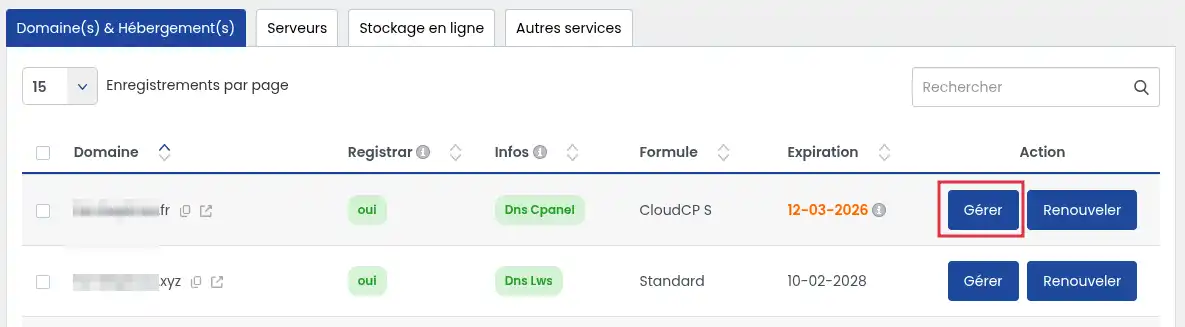
This will take you to the domain management page.
Step 3: Activate transfer protection
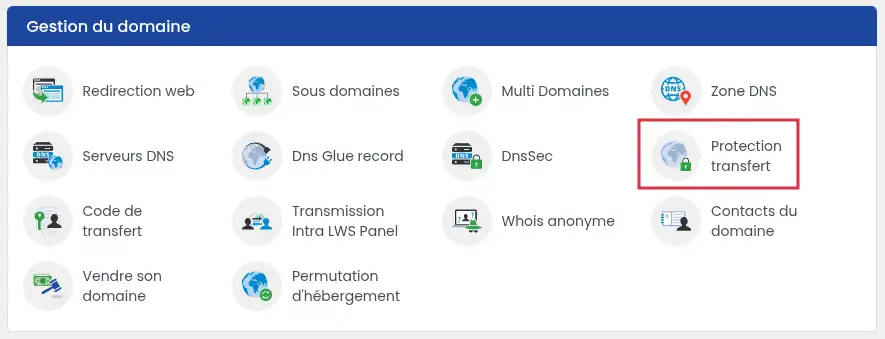
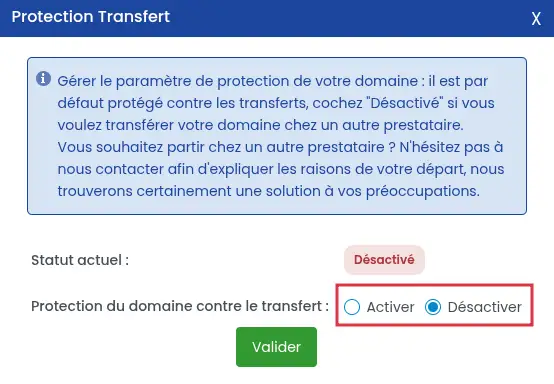
Once validated, the protection is activated or deactivated immediately.
Some domain extensions do not offer this lock.
In this case, the option does not appear in the panel.
This is normal and depends on the extension's registry.
Even without this option, your domain remains protected thanks to :
If you want to transfer your domain to another provider :
In some cases, it may not be possible to deactivate the transfer protection for your domain name.
This generally occurs when the domain does not meet the conditions for transfer.
Protection can remain active in the following situations:
What should I do in these cases?
If you cannot deactivate the protection :
If any of these situations apply, it is usually sufficient to wait until the end of the blocking period (often 60 days).
If you think that the blocking is abnormal, we recommend that you contact LWS support so that a technician can check the status of your domain.
Transfer protection is a simple and effective security measure to prevent a domain name being transferred without your consent.
We recommend that you leave this option permanently activated, unless you wish to transfer to another provider.
Rate this article :
5/5 | 1 opinion
This article was useful to you ?
Yes
No
6mn reading
How do I transfer my domain name to LWS?
1mn reading
How can I retrieve the transfer code (Auth / EPP code) for an LWS domain?
1mn reading
How to retrieve the transfer code for an OVH domain
1mn reading
How to recover the transfer code for an IONOS domain
 About LWS :
LWS is a 100% French web hosting company that focuses on quality and innovation and offers a responsive and competent technical service at affordable prices.
About LWS :
LWS is a 100% French web hosting company that focuses on quality and innovation and offers a responsive and competent technical service at affordable prices.